We have introduced a new feature that allows B2B Agents to initiate a chargeback request for a specific card transaction directly from the Cards and Transactions section.
This feature is designed to simplify the chargeback request process. Once an agent selects the relevant transaction and clicks Initiate Chargeback, the system will generate a chargeback form link almost immediately.
The chargeback form must be completed before the case can be processed further. This is required because we need to identify the dispute type and collect the necessary supporting information and evidence.
How it works
When a customer contacts you regarding a card transaction they want to dispute, open the relevant transaction in the Cards and Transactions section.
After selecting the transaction, click Initiate Chargeback.
Once the request is initiated, a link to the chargeback form will be generated. This form is connected to the selected transaction and should be completed with the required dispute details.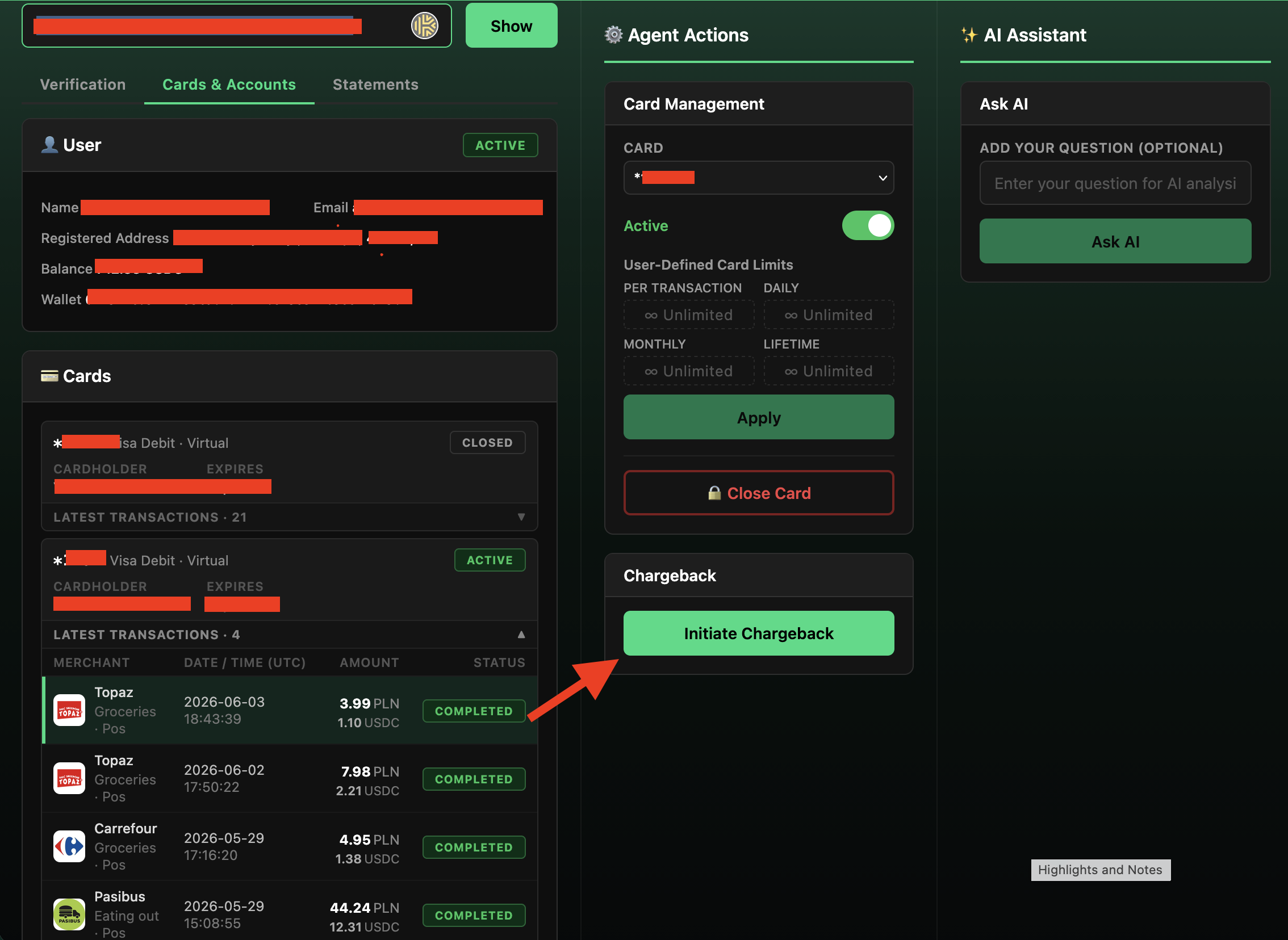
The form can be completed by either:
Who can complete the form | When to use this option |
|---|---|
Customer | When the customer should provide the dispute details and upload evidence directly |
Agent | When the agent is handling the customer’s case and has already collected the required information |
Why the form is required
The chargeback form is required to collect the information needed for further review and submission.
The form helps define whether the dispute is:
Type | Meaning |
|---|---|
Fraud / Unauthorized | The customer claims they did not authorize the transaction |
Non-fraud | The customer recognizes the transaction but disputes it for another reason, such as goods not received, duplicate transaction, overcharge, refund not received, cancelled recurring payment, or similar cases |
The form also collects supporting evidence, such as receipts, invoices, order confirmations, merchant communication, refund confirmations, delivery tracking, ATM receipts, photos, or other relevant documents.
Without this information, the chargeback team may not be able to review or submit the case properly.
What happens after the form is submitted
After the chargeback form is submitted, a ticket will be created automatically for further processing.
The created ticket will be used to:
Purpose | Description |
|---|---|
Track the case | The ticket will be the main place for monitoring the chargeback request |
Review eligibility | The responsible team will check whether the transaction can be disputed |
Request additional information | If anything is missing, the team may ask for more details or evidence |
Provide updates | Progress and outcome updates will be added to the ticket |
Important notes
Only successful card transactions can be disputed.
Transactions can only be disputed within the allowed chargeback timeframe.
Some transaction types may not be eligible for chargeback.
For 3D Secure / SCA transactions, chargeback rights may be limited for unauthorized transaction claims.
If the dispute is unsuccessful, an administration fee may apply.
What agents should do
Before initiating a chargeback request, make sure the selected transaction is correct and that the customer wants to dispute this specific transaction.
After clicking Initiate Chargeback, share the generated form link with the customer or complete the form yourself if you already have all required information.
Make sure the form is completed with accurate details and supporting evidence. The case should not be considered ready for review until the form has been submitted.
Once the form is submitted and the ticket is created, follow the updates in the ticket. If the customer later provides additional information or documents, add them to the same ticket. The created ticket will be displayed in Tickets tab.
Was this article helpful?
That’s Great!
Thank you for your feedback
Sorry! We couldn't be helpful
Thank you for your feedback
Feedback sent
We appreciate your effort and will try to fix the article